Christmas Budget & Gift Tracker: Gift List by Person, Holiday Budget & Countdown (Excel + Google Sheets)
$9.00 USD
Buy on PayhipDigital download: Excel .xlsx, works in Google Sheets. Nothing is shipped.
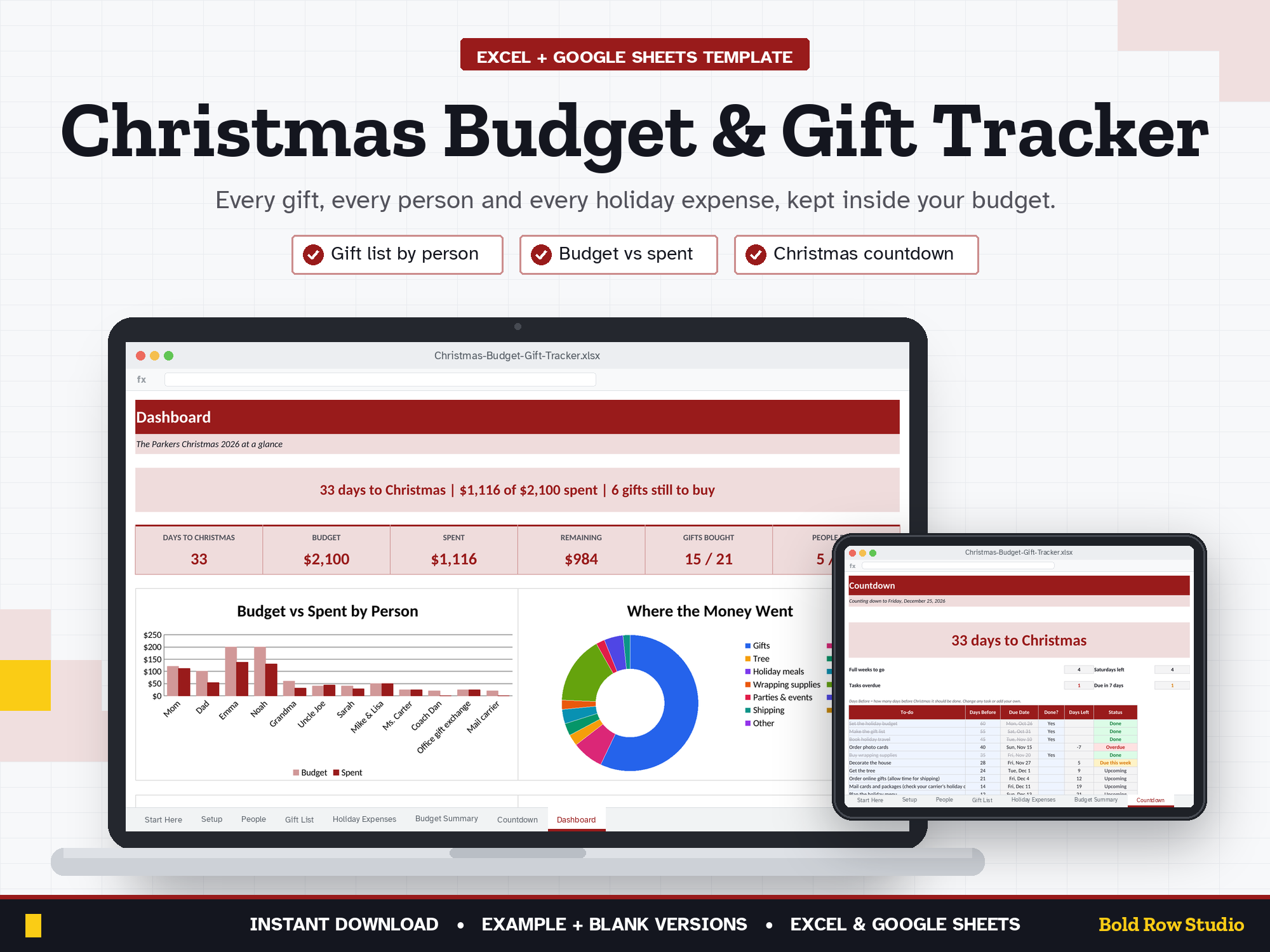
The Christmas Budget & Gift Tracker is a spreadsheet template for Microsoft Excel and Google Sheets that keeps your holiday spending in one place. List everyone you're buying for with a budget per person, track each gift from idea to wrapped, log the tree, food, travel, cards and other holiday costs, and see budget vs spent for everything, with a countdown to Christmas and a to-do list that dates itself.
The Christmas Budget & Gift Tracker is a spreadsheet template for Microsoft Excel and Google Sheets that keeps your holiday spending in one place. List everyone you're buying for with a budget per person, track each gift from idea to wrapped, log the tree, food, travel, cards and other holiday costs, and see budget vs spent for everything, with a countdown to Christmas and a to-do list that dates itself.
WHAT'S INCLUDED
- Christmas-Budget-Gift-Tracker_BLANK.xlsx: ready for your numbers
- Christmas-Budget-Gift-Tracker_EXAMPLE.xlsx: a sample family with 12 people, 21 gifts and holiday expenses so you can see how it works
- Download guide (PDF) with step-by-step Excel and Google Sheets setup
8 TABS
Start Here (built-in quick-start notes) · Setup · People · Gift List · Holiday Expenses · Budget Summary · Countdown · Dashboard
Room for 50 people, 300 gifts and 200 holiday expenses. Dropdown menus, locked formula cells (no password) and frozen headers.
KEY FEATURES
- People: budget per person, gifts planned and bought, spent, remaining and Shopping / All bought / Done / Over budget status
- Gift List: person, gift, store or link, planned vs actual price and status (Idea, Ordered, Arrived, Wrapped, Given)
- Holiday Expenses: decorations, tree, food, meals, cards and postage, wrapping, travel, parties, giving and more
- Budget Summary: gifts plus every category, budget vs spent, % used, and how much of your total budget is still unallocated
- Countdown: days, full weeks and Saturdays left until Christmas
- Holiday to-do list: set how many days before Christmas each task is due and it shows Overdue, Due this week or Done
- Dashboard: days to Christmas, budget, spent, remaining, gifts bought, people done and 4 charts
HOW IT WORKS
- Buy and download instantly: your download page opens right after checkout, and the link is also emailed to you.
- On a computer, open the BLANK file in Microsoft Excel, or upload it to Google Drive and open it with Google Sheets (the PDF guide shows both).
- Start on the Start Here tab and type your numbers into the blue cells. The grey formula cells, summaries and dashboard charts update automatically.
- Open the EXAMPLE file any time to see how a filled-in version looks.
COMPATIBILITY
- ✔ Microsoft Excel (Windows and Mac desktop, Microsoft 365)
- ✔ Google Sheets (free): upload the .xlsx to Google Drive, then Open with Google Sheets.
- ✘ Not designed for Apple Numbers or phone screens. A computer is recommended.
FREQUENTLY ASKED QUESTIONS
Q: Does it work in Excel and Google Sheets?
A: Yes. It works in Microsoft Excel (Windows or Mac desktop, or Microsoft 365) and in Google Sheets, which is free with a Google account. It isn't designed for Apple Numbers.
Q: Should I use Google Sheets or Excel?
A: Either works: the formulas, dropdowns and charts work in both. Choose Excel if you want to keep the file on your computer. Choose Google Sheets if you want a free, browser-based option you can open anywhere. For Google Sheets, upload the .xlsx file to Google Drive, right-click it and choose Open with > Google Sheets, then File > Save as Google Sheets.
Q: Can I use it on my phone or tablet?
A: It's designed for a computer screen, not a phone. Phones often can't open .xlsx downloads, so download and set it up on a computer. Once it's saved as a Google Sheet, you can open it in the Google Sheets mobile app to check your numbers, but a computer is best for setup and data entry.
Q: How do I download it?
A: Right after checkout your download page opens, and the download link is also emailed to you. Download all the files on a computer, then follow the PDF guide to open the BLANK file in Excel or Google Sheets.
Q: Can I customize it?
A: Yes. Enter your total holiday budget, gift groups (family, friends, teachers) and spending categories with their budgets on the Setup tab. Formula cells are locked without a password so they can't be overwritten by accident. To change formulas or the layout, unprotect the tab: Review > Unprotect Sheet in Excel, or Data > Protect sheets and ranges in Google Sheets.
Q: Can I get a refund?
A: Yes, within 14 days of purchase, in two cases: a file has a problem I can't fix, or you bought the same product twice by mistake. Email todorgan@gmail.com with your order details.
GOOD TO KNOW
- This is a digital product. Nothing will be shipped.
- It counts down to the next Christmas automatically, so the blank file works this year and next.
- Shipping cutoffs vary by carrier: check your carrier's holiday dates and edit the to-do list.
- A budgeting tool, not financial advice.
- For personal use. Please don't share or resell the files.
- Questions or a problem with a file? Email todorgan@gmail.com.
AI disclosure: this template was designed with the help of AI tools. The formulas, layout and example data were reviewed and tested before release.