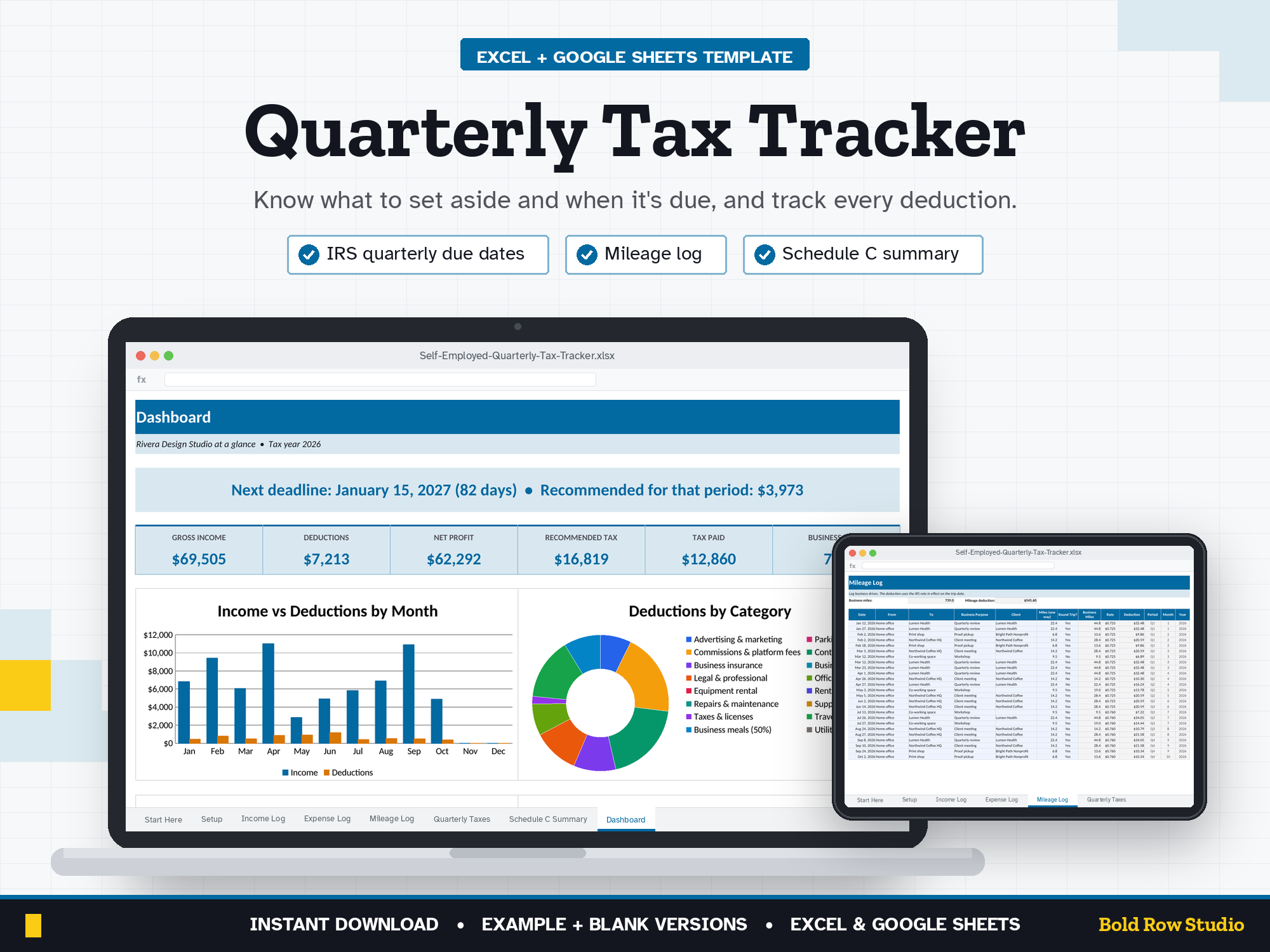
Quarterly Estimated Tax Tracker: Self-Employed Income, Expenses & Mileage Log (Excel + Google Sheets)
$16.00 USD
Buy on PayhipDigital download: Excel .xlsx, works in Google Sheets. Nothing is shipped.
The Self-Employed Quarterly Tax Tracker is a spreadsheet template for Microsoft Excel and Google Sheets that logs your business income, expenses and mileage and works out what to set aside and pay for each IRS estimated-tax period. It's for US freelancers, 1099 contractors, consultants, creators and side-business owners who pay quarterly estimated taxes.
The Self-Employed Quarterly Tax Tracker is a spreadsheet template for Microsoft Excel and Google Sheets that logs your business income, expenses and mileage and works out what to set aside and pay for each IRS estimated-tax period. It's for US freelancers, 1099 contractors, consultants, creators and side-business owners who pay quarterly estimated taxes.
WHAT'S INCLUDED
- Self-Employed-Quarterly-Tax-Tracker_BLANK.xlsx: ready for your numbers
- Self-Employed-Quarterly-Tax-Tracker_EXAMPLE.xlsx: a sample freelance business so you can see how it works
- Download guide (PDF) with step-by-step Excel and Google Sheets setup
8 TABS
Start Here (built-in quick-start notes) · Setup · Income Log · Expense Log · Mileage Log · Quarterly Taxes · Schedule C Summary · Dashboard
Room for 500 income entries, 500 expenses, 500 trips and 40 payments per file. Dropdown menus, locked formula cells (no password) and frozen headers.
KEY FEATURES
- IRS quarterly deadlines built in: the 4 payment periods (Jan-Mar, Apr-May, Jun-Aug, Sep-Dec) with due dates, rolled past weekends
- Set-aside percentage: federal + state % applied to each period's net profit, or switch to the safe-harbor method (100% / 110% of last year's tax)
- Payment log: record federal and state payments; each quarter shows Paid, Due in X days or OVERDUE
- Expense log with business-use % (phone, internet), meals counted at 50% and a missing-receipt counter
- Mileage log: round trips double automatically and the IRS rate switches on its change date (2026 rates pre-filled: $0.725, then $0.76 from Jul 1)
- Schedule C summary: deductions by quarter grouped by typical Schedule C line, plus simplified home office
- Dashboard: next deadline, income, deductions, net profit, tax paid and 4 charts
HOW IT WORKS
- Buy and download instantly: your download page opens right after checkout, and the link is also emailed to you.
- On a computer, open the BLANK file in Microsoft Excel, or upload it to Google Drive and open it with Google Sheets (the PDF guide shows both).
- Start on the Start Here tab and type your numbers into the blue cells. The grey formula cells, summaries and dashboard charts update automatically.
- Open the EXAMPLE file any time to see how a filled-in version looks.
COMPATIBILITY
- ✔ Microsoft Excel (Windows and Mac desktop, Microsoft 365)
- ✔ Google Sheets (free): upload the .xlsx to Google Drive, then Open with Google Sheets. Easy to share with your bookkeeper.
- ✘ Not designed for Apple Numbers or phone screens. A computer is recommended.
FREQUENTLY ASKED QUESTIONS
Q: Does it work in Excel and Google Sheets?
A: Yes. It works in Microsoft Excel (Windows or Mac desktop, or Microsoft 365) and in Google Sheets, which is free with a Google account. It isn't designed for Apple Numbers.
Q: Should I use Google Sheets or Excel?
A: Either works: the formulas, dropdowns and charts work in both. Choose Excel if you want to keep the file on your computer. Choose Google Sheets if you want a free, browser-based option. It's also an easy way to share the file with your accountant. For Google Sheets, upload the .xlsx file to Google Drive, right-click it and choose Open with > Google Sheets, then File > Save as Google Sheets.
Q: Can I use it on my phone or tablet?
A: It's designed for a computer screen, not a phone. Phones often can't open .xlsx downloads, so download and set it up on a computer. Once it's saved as a Google Sheet, you can open it in the Google Sheets mobile app to check your numbers, but a computer is best for setup and data entry.
Q: How do I download it?
A: Right after checkout your download page opens, and the download link is also emailed to you. Download all the files on a computer, then follow the PDF guide to open the BLANK file in Excel or Google Sheets.
Q: Can I customize it?
A: Yes. Enter your expense categories, deductible percentages, set-aside percentages and mileage rates in the blue cells on the Setup tab and the rest of the workbook updates. Formula cells are locked without a password so they can't be overwritten by accident. To change formulas or the layout, unprotect the tab: Review > Unprotect Sheet in Excel, or Data > Protect sheets and ranges in Google Sheets.
Q: Can I get a refund?
A: Yes, within 14 days of purchase, in two cases: a file has a problem I can't fix, or you bought the same product twice by mistake. Email todorgan@gmail.com with your order details.
GOOD TO KNOW
- This is a digital product. Nothing will be shipped.
- A record-keeping tool, not tax advice. Set-aside percentages are estimates; confirm with your tax professional.
- US-focused: IRS payment periods, Schedule C lines and IRS mileage rates.
- For personal use. Please don't share or resell the files.
- Questions or a problem with a file? Email todorgan@gmail.com.
AI disclosure: this template was designed with the help of AI tools. The formulas, layout and example data were reviewed and tested before release.