Rental Property Tracker: Rent Log, Expenses, Schedule E Summary & ROI for Landlords (Excel + Google Sheets)
$19.00 USD
Buy on PayhipDigital download: Excel .xlsx, works in Google Sheets. Nothing is shipped.
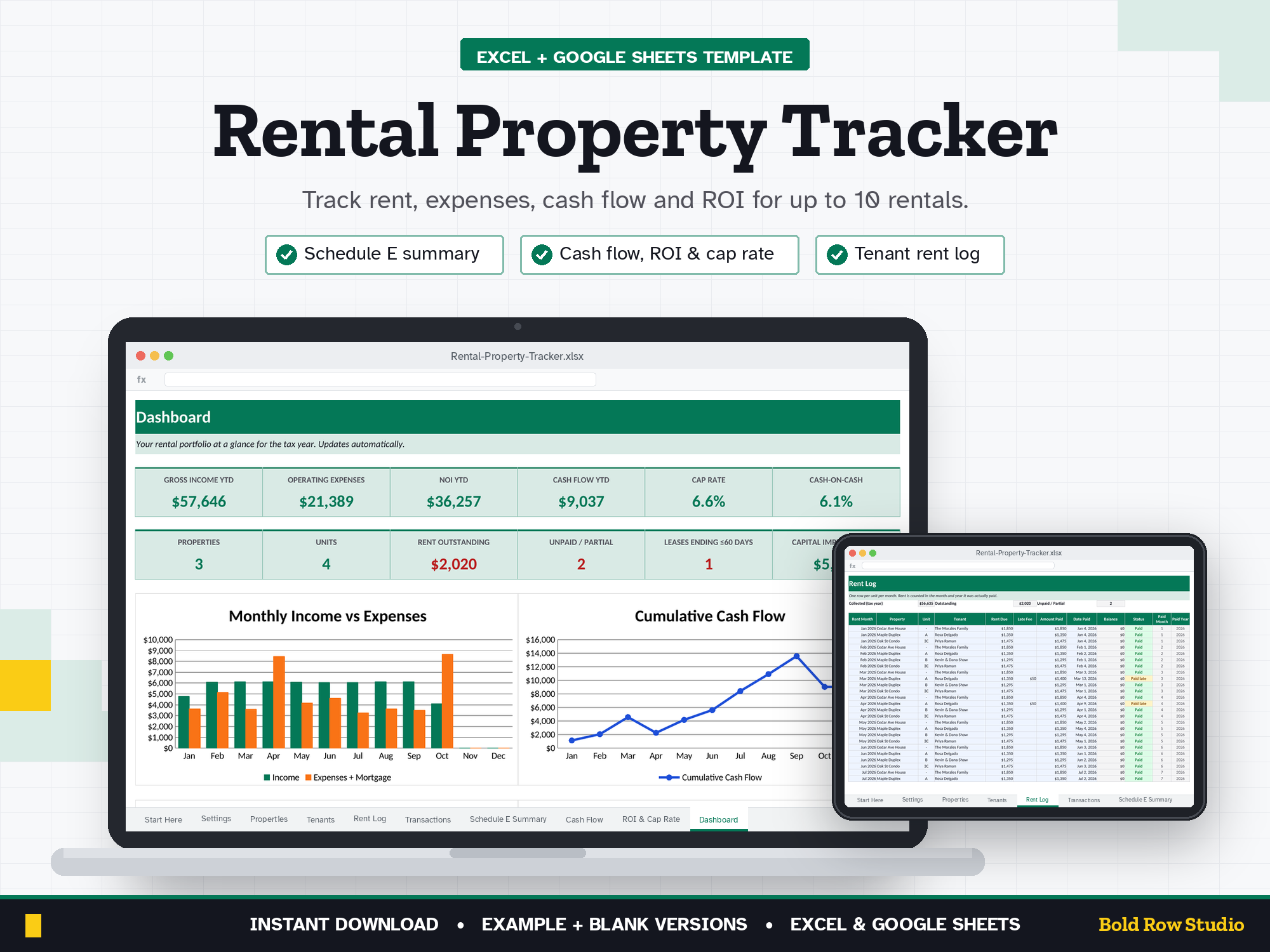
The Rental Property Tracker is a spreadsheet template for Microsoft Excel and Google Sheets that tracks rent, expenses, cash flow, ROI and cap rate for up to 10 rental properties, with a Schedule E summary for tax time. It's for small landlords and new real estate investors who want clear numbers without paying for property-management software every month.
The Rental Property Tracker is a spreadsheet template for Microsoft Excel and Google Sheets that tracks rent, expenses, cash flow, ROI and cap rate for up to 10 rental properties, with a Schedule E summary for tax time. It's for small landlords and new real estate investors who want clear numbers without paying for property-management software every month.
WHAT'S INCLUDED
- Rental-Property-Tracker_BLANK.xlsx: ready for your properties
- Rental-Property-Tracker_EXAMPLE.xlsx: a sample 3-property portfolio so you can see how it works
- Download guide (PDF) with step-by-step Excel and Google Sheets setup
10 TABS
Start Here (built-in quick-start notes) · Settings · Properties · Tenants · Rent Log · Transactions · Schedule E Summary · Cash Flow · ROI & Cap Rate · Dashboard
Room for 10 properties, 50 tenants, 600 rent entries and 1,000 transactions per file.
KEY FEATURES
- Rent Log: rent due, late fees, amount paid and status (Paid, Paid late, Partial, Unpaid) for every unit, every month
- Transactions: every expense and other income, by property. Pick a category and the Schedule E line fills in automatically
- Schedule E Summary: income and expenses per property, grouped by IRS Schedule E line, for you or your tax preparer
- Cash Flow: monthly cash flow for one property or your whole portfolio (dropdown)
- ROI & Cap Rate: NOI, cash flow, cap rate (on purchase price and on current value), cash-on-cash return and expense ratio
- Tenants: leases, contacts and deposits, with "Renew soon" alerts 60 days before a lease ends
- Dashboard: portfolio KPIs plus 4 charts
HOW IT WORKS
- Buy and download instantly: your download page opens right after checkout, and the link is also emailed to you.
- On a computer, open the BLANK file in Microsoft Excel, or upload it to Google Drive and open it with Google Sheets (the PDF guide shows both).
- Start on the Start Here tab and type your numbers into the blue cells. The grey formula cells, summaries and dashboard charts update automatically.
- Open the EXAMPLE file any time to see how a filled-in version looks.
COMPATIBILITY
- ✔ Microsoft Excel (Windows and Mac desktop, Microsoft 365)
- ✔ Google Sheets (free): upload the .xlsx to Google Drive, then Open with Google Sheets
- ✘ Not designed for Apple Numbers or phone screens. A computer is recommended.
FREQUENTLY ASKED QUESTIONS
Q: Does it work in Excel and Google Sheets?
A: Yes. It works in Microsoft Excel (Windows or Mac desktop, or Microsoft 365) and in Google Sheets, which is free with a Google account. It isn't designed for Apple Numbers.
Q: Should I use Google Sheets or Excel?
A: Either works: the formulas, dropdowns and charts work in both. Choose Excel if you want to keep the file on your computer. Choose Google Sheets if you want a free, browser-based option. For Google Sheets, upload the .xlsx file to Google Drive, right-click it and choose Open with > Google Sheets, then File > Save as Google Sheets.
Q: Can I use it on my phone or tablet?
A: It's designed for a computer screen, not a phone. Phones often can't open .xlsx downloads, so download and set it up on a computer. Once it's saved as a Google Sheet, you can open it in the Google Sheets mobile app to check your numbers, but a computer is best for setup and data entry.
Q: How do I download it?
A: Right after checkout your download page opens, and the download link is also emailed to you. Download all the files on a computer, then follow the PDF guide to open the BLANK file in Excel or Google Sheets.
Q: Can I customize it?
A: Yes. Enter your tax year, rent due day, grace period and expense categories (each mapped to a Schedule E line) in the blue cells on the Settings tab and the rest of the workbook updates. Formula cells are locked without a password so they can't be overwritten by accident. To change formulas or the layout, unprotect the tab: Review > Unprotect Sheet in Excel, or Data > Protect sheets and ranges in Google Sheets.
Q: Can I get a refund?
A: Yes, within 14 days of purchase, in two cases: a file has a problem I can't fix, or you bought the same product twice by mistake. Email todorgan@gmail.com with your order details.
GOOD TO KNOW
- This is a digital product. Nothing will be shipped.
- A record-keeping tool, not tax, legal or investment advice. Confirm tax treatment with your tax professional.
- Amounts are shown in US dollars ($). Schedule E categories follow the US IRS form.
- For personal use. Please don't share or resell the files.
- Questions or a problem with a file? Email todorgan@gmail.com.
AI disclosure: this template was designed with the help of AI tools. The formulas, layout and example data were reviewed and tested before release.